webfilteringdatabase.com
Home Find Your Solution
Features
Domain Categorization API Real-Time Classification 58 Filtering Categories Offline Database (120M) SaaS App Hostnames Managed DNS Filter ML Classification Content Classification
Industries
K-12 Schools Corporate Healthcare Government ISPs
Tools
Domain Lookup Bulk Categorization Category Explorer
Resources
Pricing API Documentation Login / Sign Up
Threat Category

Phishing Domain List and Detection

Identify and block phishing domains used for brand impersonation, credential harvesting and social engineering. About 300,000 new domains are categorized every day, and each is checked again after a week and after a month.

How Phishing Domains Are Identified

Phishing domains are websites built to trick people into handing over passwords, payment details or other sensitive information by imitating trusted brands, services or people. In our database they sit in the Malware / Phishing / Suspicious category, categorized from site content, reviewed and validated.

Phishing campaigns rely on domains that look close to the real thing. Typical tricks are lookalike spellings (examp1e-bank.test), characters from other alphabets that look like Latin letters, and a trusted name placed in a subdomain (login.example-bank.test.account-check.test). The category covers all of these patterns.

Within our database of 120 million categorized domains, phishing is one of the fastest-changing threat categories, because many phishing domains are used for a short time and then replaced. About 300,000 newly registered domains are categorized every day and delivered as daily delta files.
Stop the click earlier

Block bad lookups before a page loads

Phishing pages live for hours, so a DNS answer that never resolves is faster than any warning. Our managed filter applies category data at the lookup, with one DNS address on your router or firewall.

  • Lookalike addresses meet the security categories at the moment the browser asks.
  • No appliance and no agent to install on each computer.
  • Activity search shows which device asked for a blocked address.
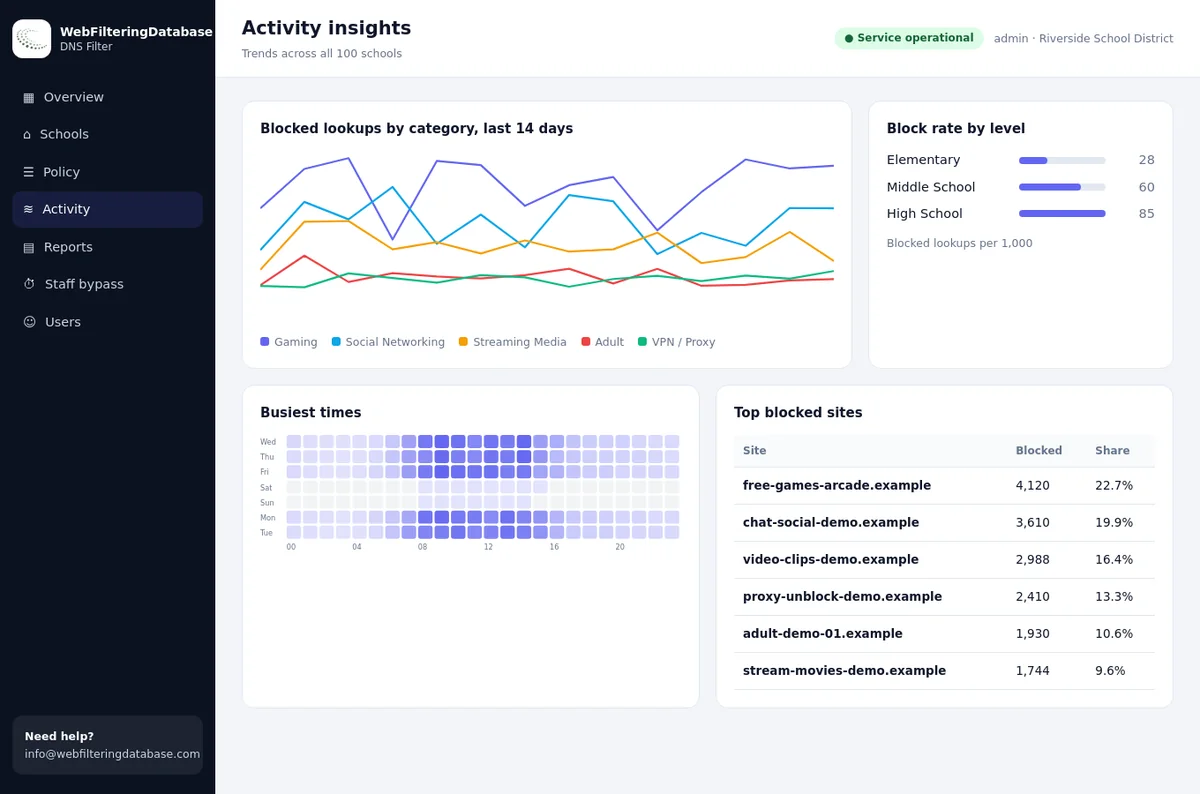
Category trend charts in the managed filter for spotting blocked lookups
Milliseconds
for a DNS decision on each lookup
300,000
new domains categorized every day
1 address
set once on router or firewall

Phishing Techniques the Category Covers

The main ways phishing websites reach and deceive users

Brand Impersonation

Domains imitating banks, technology companies, delivery services and online shops. Impersonation pages are covered even when the domain name looks unrelated to the brand being copied, because the category is based on what the site shows.

Credential Harvesting

Login pages built to capture usernames, passwords and multi-factor codes. This includes pages that pass the stolen details on to the real site in real time, so the victim notices nothing unusual.

Business Email Compromise

Domains supporting CEO fraud and invoice redirect attacks on finance teams. These sites host fake portals that look like internal systems, cloud email or supplier payment pages, and they are often registered for one specific campaign.

SMS Phishing (Smishing)

Short domains and redirects built for phishing by text message. They often use URL shorteners, open redirects or numeric domain names. The landing page a victim finally reaches is categorized by what it shows, not just the first link.

QR Code Phishing (Quishing)

Domains placed in malicious QR codes in emails, posters, parking meters and documents. QR codes slip past email link scanning, so blocking the domain at the network is an important second layer.

Cloud Service Abuse

Phishing pages hosted on large cloud platforms, site builders and collaboration tools, so the address looks trustworthy. Host names that serve phishing on shared platforms are categorized on their own, separately from the platform.

How the Phishing Category Stays Current

Daily new-domain coverage, repeat checks and regular validation keep the list of phishing websites useful

New Domains Daily
About 300,000 per day
Week Check
Second look after 7 days
Month Check
Third look after a month
Daily Delta Files
New and changed domains
Monthly Refresh
All other domains
Manual Validation
Regular accuracy checks
Ranked Categories
Several labels per domain
Lookup API
Included with licences

From New Domain to Blocked Domain

A newly registered domain is categorized from its content on the day it is first seen. If it already hosts a fake login page, it lands in Malware / Phishing / Suspicious and ships in that day's delta file.

Many phishing domains stay empty for a while before a campaign starts. That is why each new domain is checked again after a week and after a month, when a lot of them add their content.

Results run inside your own systems as CSV, Parquet or JSON, or as ready exports such as DNS RPZ and firewall external dynamic lists. Domains not yet in your local copy can be checked with the lookup API.

Brands in our data

How the genuine brands are labelled

Phishers copy well known names, so knowing how the real domains are labelled helps when you compare an odd address. These are the real entries for brands that attackers often copy.

Genuine domainLabels in our data
paypal.comFinancial Services, Online Banking
chase.comFinancial Services, Online Banking
docusign.comWeb-based Applications
dhl.comAutomotive & Transportation, Business
office.comWeb-based Applications

Phishing Category Facts

Coverage facts for the database behind the phishing category

120M
Categorized Domains in the Database
300K
New Domains Categorized Daily
2
Repeat Checks: After a Week and a Month
58
Web Filtering Categories

Common Phishing Domain Patterns

Deceptive naming techniques, shown with placeholder .test names only

secure-example-bank-login.test Brand name in subdomain/path deception
exampel-software-verify.test Typosquatting with plausible misspelling
examp1e-pay-account-update.test Lookalike character using number substitution
example-phone-id-suspended-verify.test Urgency trigger with brand name
example-stream-billing-update247.test Subscription service impersonation
example-parcel-tracking-id.test Shipping notification phishing
Where devices roam

Phishing protection that follows the laptop

A private encrypted link applies the same rules to devices away from the network and where a provider redirects DNS. Staff can use a logged PIN bypass for 15, 30 or 60 minutes, and it switches itself back.

Integration Guide for Phishing Protection

Deploy phishing domain blocking across your email gateway, web proxy, and DNS infrastructure

Multi-Layer Phishing Defense

Effective phishing protection blocks at several layers. Email security gateways can check links in incoming messages against the category before they reach inboxes, including links in attachments and calendar invitations.

At the web proxy, the category stops users from reaching phishing sites even after they click a link that slipped through email filtering. DNS-level blocking gives the broadest cover, for every application and device on the network.

Teams building their own security tools use the lookup API included with a licence together with the daily delta files. Security orchestration playbooks and browser extensions can then act on new phishing classifications every day.

  • Email gateway integration via URL rewriting
  • Firewall external dynamic lists (EDL)
  • DNS RPZ feed for recursive resolver blocking
  • Daily delta files for newly categorized domains

Phishing Domain Check API

  • Look up any domain or URL and get its ranked categories
  • Phishing returns as Malware / Phishing / Suspicious
  • Use it for domains not yet in your local copy of the database
  • Included with every licence
See the lookup API

Email Gateway Integration

  • Extract the domains from every link in a message
  • Check them against the local database or the lookup API
  • Quarantine messages that point to the phishing category
  • Check again at click time for links that change after delivery
Phishing domain patterns

How to Identify a Phishing Domain

Most phishing domains follow a small set of naming tricks. Every example below is a placeholder under the reserved .test domain, so none of them points to a real site.

Brand plus an action word

A brand name joined to login, verify, secure, update or support, to look like an official account page.

example-bank-login.test

Lookalike spelling

One letter swapped, doubled or dropped, or a digit in place of a letter. Easy to miss on a phone screen.

examp1e-bank.test

Brand in the subdomain

The real brand appears first, but the domain that matters is the one at the end, right before the extension.

example-bank.account-verify.test

Lookalike characters

Letters from other alphabets that look like Latin ones. In the address bar they may show as an xn-- form.

xn--exmple-bank.test

Urgent service themes

Parcel delivery, unpaid tolls, tax refunds, locked mailboxes and expiring subscriptions. The name itself creates pressure.

parcel-fee-example.test

Pages on shared hosting

A fake login page placed on a free site builder or file host, so the domain itself looks trustworthy.

sites.example-host.test/bank-verify

Quick phishing domain check before you click

  1. Read the domain right to left, from the extension back to the first dot.
  2. Compare it letter by letter with the address you already know.
  3. Be wary of a brand inside a longer, hyphenated name.
  4. Treat very new domains asking for passwords as suspect.
  5. Check the domain in the URL checker to see its category.
  6. When in doubt, type the known address yourself instead of following the link.
Lifecycle

The Lifecycle of a Phishing Domain

Phishing domains are built to be used quickly and thrown away. Knowing the stages explains why a list of phishing websites needs daily updates rather than monthly ones.

Stage 1

Registration

The domain is bought, often together with several similar names for later campaigns.

Stage 2

Waiting

It may sit empty or show a harmless page so it does not look suspicious when first seen.

Stage 3

Setup

Hosting and a certificate are added and a phishing kit is uploaded, copying a real login page.

Stage 4

Campaign

Links go out by email, text message, chat or QR code. Most victims click in the first hours and days.

Stage 5

Rotation

Once blocked or reported, the attacker moves to the next prepared domain.

Stage 6

Afterlife

The domain is taken down, abandoned, parked or later registered again by someone else.

Because stages 1 and 2 can look harmless, a domain that is clean on the day it is registered is not proven safe. That is the reason for the later checks below.
Newly registered domains

Checks on Day One, After a Week and After a Month

About 300,000 newly registered domains are categorized every day. Each one is checked again after a week and after a month, because many sites, honest and malicious, add their content after launch.

CheckWhat it typically findsWhat you receive
Day oneDomains that launch with phishing content at once, plus many parked and empty pages.Categories in the daily delta file
After a weekDomains that were empty at registration and have since gained a fake login page or a scam shop.Updated categories in the delta file for that day
After a monthSlower campaigns, re-used domains and sites that changed purpose after the first weeks.Updated categories in the delta file for that day
Monthly after thatLong-term changes, such as expired domains picked up by new owners.Part of the regular monthly refresh
Many teams also hold every domain younger than a set age in a stricter policy until its later checks are done. The category data and the registration age work well together for that rule.
Phishing domain list in products

How Firewalls and DNS Filters Use the Phishing Category

In the database, phishing websites sit in the Malware / Phishing / Suspicious category. Security products block it everywhere, for every user group. Here is where it plugs in.

DNS filters and resolvers

Lookups for listed domains return a block page or no answer. This covers browsers, apps and devices that cannot run an agent. See DNS filtering vs web filtering.

Next-generation firewalls

The category is loaded as an external dynamic list or built into the URL filtering engine, then used in a deny rule above all allow rules.

Secure web gateways

Requests are matched on the full host name, so phishing pages on subdomains are caught even when the parent domain is allowed.

Email and chat security

Links in messages are checked against the category before delivery or at click time.

Browser extensions and apps

A local copy of the list gives fast, private checks without sending every visited address to a server.

Security analytics

Logs are enriched with categories so analysts can see which users reached a phishing domain and when.

Phishing and malware domain feed

Formats, refresh timing and how the security categories fit together, written for vendors building a product.

Read about the domain feed

Phishing domain check

Look up a single address to see how it is categorized. For bulk checks, licensed customers use the lookup API.

Open the URL checker
ExportWhere it is used
DNS RPZBIND, Unbound and other resolvers that support response policy zones
Firewall EDLFirewalls that read a hosted list of domains on a schedule
Hosts fileSingle machines, kiosks and small lab setups
AdGuard / Pi-hole style listHome and small office DNS filters
PAC fileBrowsers configured to use a proxy script
CSV, Parquet, JSONProduct databases, data pipelines and analytics

Each format is explained in the blocklist formats guide. Related security categories: malware domains, botnet domains and spam domains.

Found one?

How to Report a Phishing Domain

Blocking protects your own users. Reporting helps get the page taken down for everyone else. These are the usual places to send a report, in a sensible order.

Your email or messaging provider

Use the built-in "report phishing" option on the message. It trains the provider's own filters and removes similar messages for other users.

The impersonated organisation

Most banks, shops and software companies publish an address or form for phishing reports on their security or help pages.

The registrar and the host

Look up the domain's registrar and hosting provider and send the full link to their abuse contact. They can suspend the domain or remove the page.

Your national reporting service

Many countries run a cyber security centre or fraud reporting service that collects phishing reports. Check your government's current guidance.

Do not enter any details on the page to "test" it, and never forward a live phishing link to colleagues. Share it as plain text with the dots replaced, for example example-bank-login[.]test.

Reacting to phishing reports or filtering by category

A report-driven routine and a category filter solve different parts of the problem.

QuestionReactive routineManaged DNS filter
When does a block startAfter someone clicks and reportsAt the first lookup of a categorized domain
New lookalikes each dayAdded to a list manuallyAbout 300,000 new domains categorized daily
Staff on the moveOnly protected inside the officePrivate encrypted link on laptops and phones
Need a legitimate exceptionRewrite the ruleAlways-allow list and logged PIN bypass
Evidence for an incidentSearch several toolsSearchable activity and CSV exports
Several officesOne setup per placeOne dashboard, a policy per site
Questions

Phishing Domain List: Frequently Asked Questions

How can you identify a phishing domain?

Look for a brand name joined to words like login, verify or secure, small spelling changes, the real brand placed in a subdomain in front of an unrelated domain, lookalike characters, and a very recent registration date. None of these proves phishing on its own, so check the domain against a category database before you trust it.

How do I run a phishing domain check?

Enter the address in our URL checker to see its categories. Vendors and security teams run the same check at scale through the lookup API included with a licence, or against the downloaded database inside their own systems.

Which category do phishing websites fall into?

Phishing websites are placed in the Malware / Phishing / Suspicious category, one of 58 web filtering categories. Security policies normally block it on every network and for every user group.

Why are new domains checked again after a week and a month?

Many phishing domains are registered first and armed later. A domain that showed an empty page on day one can host a fake login page a week later, so each of the roughly 300,000 domains categorized daily is checked again after a week and after a month.

Can I get a list of phishing websites as a firewall or DNS blocklist?

Licensed customers can take the category as DNS RPZ zones, hosts files, AdGuard or Pi-hole style lists, firewall external dynamic lists or PAC files, in addition to CSV, Parquet and JSON. Daily delta files keep the list current.

What is the difference between phishing and malware domains?

Phishing domains try to trick a person into typing in passwords or payment details on a fake page. Malware domains deliver harmful software or control infected devices. Both sit in the Malware / Phishing / Suspicious category, so one block rule covers them, and our malware domains page covers the software side.

Is there a phishing website to test my filter with?

Never test with a live phishing site. Use placeholder names under the reserved .test domain in a lab, and check your policy maps the Malware / Phishing / Suspicious category to a block action.

Pricing is set by how many sites and devices need protecting. A pilot on one site lets you review the blocks and reports first.

Related Security Categories

Build a comprehensive threat filtering policy by combining multiple categories

Build phishing protection on your own copy of the data

The phishing category ships with all 58 web filtering categories in one file that runs inside your systems, with a lookup API included. Starter database tiers from $999; enterprise and OEM licences are quoted per deployment.

Talk to us

Brand and product names mentioned on this page are trademarks of their respective owners. They are used only to describe how phishing domains imitate real services. Web Filtering Database is not affiliated with, sponsored by or endorsed by any of these companies.